Amazon Journeys
Product Design - Online Marketing Tool
Journeys is an internal tool used primarily to produce 1st party device campaigns and promotions on Amazon.com. Online marketers create and manage a variety of page templates in Journeys to generate localized content on the homepage and detail pages for Amazon customers in North America, Canada, and Mexico.
Overview
I facilitated UX design and research in the Devices & Services group at Amazon in 2022. I supported the Journeys product under the Automate & Scale initiative, where I designed, tested and released the new Multi Creative Campaign feature (below). I created a holistic design update for a vision refresh, or future state, of the Journeys tool in the form of an interactive Figma prototype which tested successfully with users across the globe. Additionally, I provided UX guidance and engineering support for quality of life enhancements and improved usability, including adoption of the Meridian Design System for updates to page components such as global navigation, forms and tables, action bars and actions, sorting and filtering, as well as notifications and modals.
Screens - Multi CAMPAIGN CREATION

Single scrolling long form composed of four stacked modules (shown side by side). Campaign Overview and Content Configuration (left), Placement Configuration and Campaign Summary (right).
Problems and Goals
Online marketers spend too much time creating and managing their creative campaigns in Journeys and they need an improved experience with new features to help reduce repetition and automate their workflow. Journeys was originally designed with users from NA, CA and MX in mind, but the tool should be capable of meeting the unique of requirements of EMEA and APAC marketers as well. The Journeys product is in the early to mid development stage with considerable UX debt and limited resources, where customer satisfaction and ease of use may be greatly improved with further UX design and support.
Goals
• Launch new campaign automation feature for users in NA, CA and MX
• Create a future state, or vision refresh, of the Journeys product for worldwide users
• Improve usability and enhance design building upon existing UX framework
Responsibilites and Outputs
I reported to a manager and worked alongside another designer supporting Journeys from within a larger UX and research team. I was accountable for promoting the UX discipline and sharing best practices amongst program managers, engineers and stakeholders. I partnered with engineering to troubleshoot and solve existing design related issues, improve deliverables and design processes, and helped to plan, research, and create new and innovative product features. It was my duty to provide fresh ideas and elegant solutions which met project requirements and exceeded user expectations.
Outputs
• Interviewed and shadowed Journeys users to create a comprehensive journey map identifying pain points and process gaps for stakeholder share out and team workshop event
• Conducted user research to inform iterative designs of Multi Campaign automation feature and Vision Refresh prototype
• Utilized Meridian Design System components to produce auto-layout Figma files for review, share out and engineering handoff
Solutions and Outcomes
I tested and confirmed my automation and vision designs with marketers to be certain pre-populated forms and inheritable values would be flexible enough to share common details across desktop and mobile platforms, as well as multiple languages, and yet remain simple and intuitive enough to ensure adoption. I envisioned a new product which effectively combined three disparate tools in one and I created a Vision Refresh prototype to ensure not only current feature parity but account for scalable automation features in the future. The engineering team followed my recommendation to migrate from the Bootstrap 2.0 design library to the Amazon Meridian design system, ensuring Journeys will benefit from Meridian’s engaging and inclusive collection of UI guidelines, front-end components, design resources and development tools, as the product continues to grow and mature.
Outcomes
• UX inheritance pattern adopted as foundation for automation experience — Multi Campaign feature is successfully created, released and well met by users, resulting in approximately 4.2k hours saved annually in campaign creation
• Vision Refresh prototype combines tools and tasks for global users and new product design enables the business strategy and operational planning to move forward with a fully realized and tested model, where the time savings was estimated to be approximately 7.2k hours annually.
• Aligned overall UI design and improved UX with Meridian components and patterns that are easily consumed and more quickly implemented by developers, resulting in a contemporary product that looks unified and feels intuitive to the end user. These core UX enhancements were expected to save approximately 1.2k hours annually for online marketers.
Design Process
Each project is unique, but every product or service shares the same universal goal – to meet and exceed the needs of its users. To achieve this goal, I rely on a user-centered design process which consists of three distinct steps: Discover, Design and Deliver. During each step, I apply research methods, creative tools, and design techniques that focus on the user (who they are, what they do, how they feel) and are meant to enhance the user experience, increase usability, and improve ease of use. This cyclical framework not only guides my choices and informs my designs throughout a project, but it can also help define and align business requirements and software development strategy as well.
1. Discover
In the beginning, it’s all about learning. I seek to understand users and empathize with their needs. I identify and investigate their issues and address the problems they encounter. This is the time to gather project requirements from the business and join forces with the engineers who are developing the software. During this step, I may facilitate my own research or partner with a research team to gather valuable data that can then be synthesized into actionable insights. Those objective findings will serve as the foundation on which my design proposals and solutions will rest, and I can then validate my designs early and often through user testing without bias or assumption.
Customer Journey and Workshop
I began by immersing myself in the day-to-day business of the online marketer. I wanted to discover and document their promotion and merchandising process to capture pain points and identify opportunities for improvement. I conducted interviews and shadowed users to inform my design of a comprehensive journey map and helped facilitate a workshop with stakeholders and partners where we discussed phases in the process and the specific roles at work during each phase. The map deliverable and service design workshop helped to create a better understanding of the lengthy process and the many players involved, which resulted in alignment and support in identifying steps that could be automated in the Journeys tool.

Journey map design for Temporary Price Reduction flow (above). Step by step actions and pre-populated fields. Journey phases and user roles (below).


User Research and Testing
Journeys users create, edit, and search campaign images from the Assets Tab. Front-end development was scheduled to take place and so there was an opportunity to improve the UX while the engineers were rebuilding the page with React Meridian components. I conducted research and shared my findings so that I could better redesign the Asset Tab experience with confidence and support. I learned just how users interacted with actions like sort and filter, tag, and delete. And I gauged the ineffectiveness of the existing workflow and how we might improve by sharing my proposed designs and eliciting their feedback. For example, I discovered that users very rarely tagged their assets because they perceived it as optional, and yet they could not filter or sort effectively because there was no metadata to filter or sort by.
-
User Research
Six users were briefly interviewed (2 EU/4 NA) and asked about their current Assets Tab experience and how it might possibly be improved. Users were asked about their workflows and typical use cases. Special attention was made of asset tagging and the perceived lack of tagging. Proposed design updates to the grid view, as well as a new list view, were shown to gauge interest, collect feedback and entertain feature requests.
Use Case
“As a Journeys user, I want to more easily view, sort and filter all the assets in the project of my choosing.”
Hypothesis 1
Because assets typically do not include metadata, filtering and sorting is ineffective. Users are not tagging assets at the point in which they are uploaded to Journeys because it involves approximately four extra steps for each asset and the UI communicates these additional steps as optional. Therefore, in order to provide effective filtering and sorting, users must be required to input metadata tags when they upload an asset to Journeys.
Hypothesis 2
The collection of assets can be great in number and slow to display. The sheer number of assets combined with the limitations of the current grid view results in an undesirable experience, from both a performance and usability standpoint. Therefore, to increase performance and findability, a pagination component must be included in the UI, where users can select the number of asset results per page and navigate more than one page of assets. And, in order to increase the usability and value of the current grid view, an updated design must account for a larger, single card component that allows for title display without truncation and an overall increased thumbnail size (approximately 40%). Also, in order to increase usability, a list view must be added as an optional way for users to find and locate assets with an increased number of results per page. Image thumbnail size is de-emphasized in favor of a prominent asset title and additional data columns.
Findings
• Users would find it painful and tedious to be required to tag each individual asset. Users perceive that tagging assets is optional and instead use their own unique title labelling methods to manage their assets and account for classifications.
• Users did not at first appear to realize that the lack of tagging, and therefore the lack of available metadata, is directly related to their inability to filter and sort effectively
• Because users typically upload assets from a modal at the time of campaign creation, they tend to view, sort and filter assets within said modal, rather than the Assets Tab.
• Users are currently unable to delete an asset which has been uploaded to the Asset Tab, as this action does not exist in the product today.
• The list view design proposal was perceived as beneficial. Users found value in the proposed grid view update, regarding increased image size and titles without truncation.
• Users requested a prominent timestamp display or label for each asset.

Existing Bootstrap 2.0 design and opportunities to improve UX. Campaigns View before and Assets View before (above).
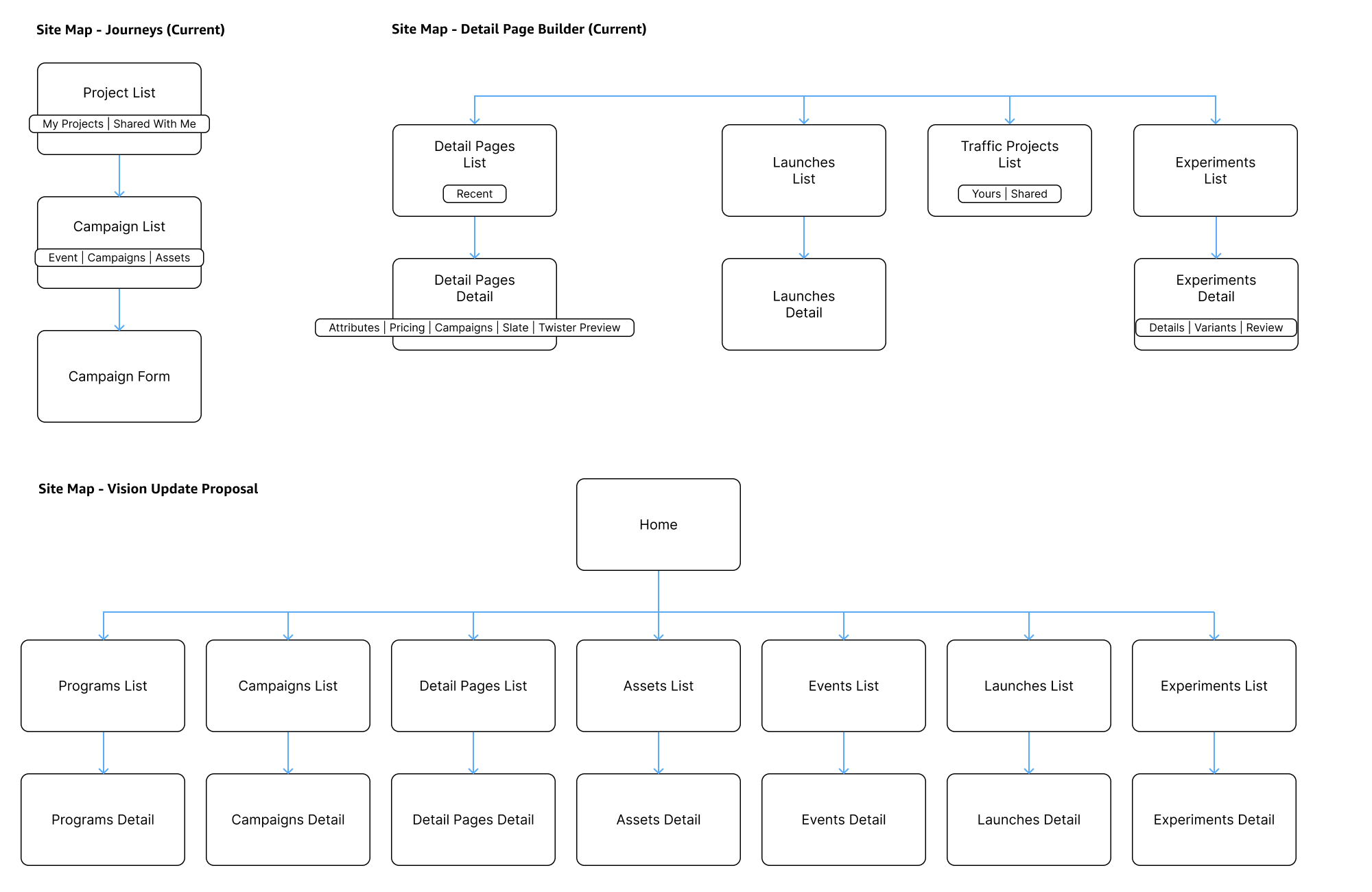

Site map and page consolidation, sorting and grouping audit for inherited values, and batch operations flow diagram (above). Preliminary design concepts utilizing toggle component for inherited values and proposed summary table module (below). I learned that users found it useful to see campaign variations in one all-up table where they could request approvals and approve requests, confirm content and placement values, as well as track status. We placed the column data according to review and workshop feedback.

2. Design
At this stage, my creative juices are flowing. I’m inspired to try something new or take the unexpected approach. Now is the time for wild ideation that can lead to product innovation and increased benefits like customer satisfaction and loyalty, engagement and adoption, and conversion and sales. During this step, I’m constantly generating and evaluating my ideas as I collaborate with designers, engineers, and users to create solutions that exceed expectations. I may design low-fidelity wireframes intended as conversation starters or detailed interactive prototypes for use in research and testing, but I more often improve upon existing or new designs through constant iteration and revision.
Figma Components and Meridian Design System
I was successful in convincing the engineering team to utilize Amazon’s Meridian design system. All the components in the Meridian design library were heavily vetted in terms of testing and accessibility, and the library documentation and code snippets greatly aided engineering efforts. Not only did the developers benefit from the use of new React components as they built new features and updated existing functionality, but end users found it easier to achieve their goals as well. I find that using a design system helps to deliver clear intent and serves as a single source of truth. The benefits of building a comprehensive tool using a unified design system approach include consistency, efficiency and improved quailty.

Meridian Design System Components: left panel nav, top level nav, nav overflow (left). Success toast, caution toast w/ CTA link (right).

Initial table-based Vision Refresh design includes Meridian action bar (left). Users edit line item values using the Meridian pull sheet component (right).
Design Advocacy AND Engineering Support
I make every effort to maintain a balanced working relationship with developers, as well as building successful partner processes with new business groups. I spend a lot of time triaging and troubleshooting design related issues alongside engineers and stakeholders, whether they are bugs, backlog items, user feedback, or feature requests. I build my Figma deliverables with speed and accuracy, capturing the iterative process while addressing questions and concerns in real-time, along the way.


Figma files and Agile tickets; UX support for engineering backlog. UX design iteration for Bundle Manager feature (above).

Before UX guidance: existing usage of input field errors, where every required field appears in error state (left). After UX guidance and Meridian components: preferred usage of input fields, where required fields are marked with an asterisk, allowing for input error alerts with helper text and accompanying alert notification bars in context (right).
3. Deliver
This step is about more than just a Figma file handoff and often signals that it’s time to repeat the process to further refine and improve the user experience. It’s a time to review my work with the team and iterate on the designs, rather than finalize and submit. At this stage, I might seek further input from stakeholders and/or elicit additional user feedback. Typically, it means that my designs are ready for developers to consume and implement. I support engineers with high-fidelity designs that account for edge case and What if…? scenarios, as well as documentation annotated with component functionality and user interactions.
Improved usability and New Features
Having conducted the Asset View research, I knew users wanted creative freedom when building campaigns in Journeys and the practical approach was to improve the existing UX framework. As a result, I created a new grid view with more prominent card components and accompanying list view, both of which featured action bar components that aided in tagging, parsing, filtering, and sorting. I provided designs for a notification system which alerts users to critical promotion changes, and additional designs for a daily email digest summarizing campaign changes and performance data visualization.

User Research informs Meridian Design System update. Campaigns View after and Assets View after (above). Bundle Manager, Email Digest, and Notifications features (below).


Future Product Vision and Interactive Prototypes
After operational planning and requirements updates, the Journeys tool needed a holistic design update. The future vision focused on global users and their unique needs in building out campaigns for desktop and mobile across multiple regions and languages, using inherited values, bulk actions and image editing functionality. I designed and tested the new Journeys vision refresh using Meridian components in a clickable Figma prototype. I used real data from Valentine’s Day 2023 to inform the design and incorporated feedback from European users in my exploration and ideation. The prototype (below) showcases a non-sequential flow or stepped pattern, a.k.a., a ‘Wizard’ user interface, and features 8 products, 6 marketplaces + languages, and 5 homepage templates, which results in the creation of 57 unique and editable assets all at once.


Copyright all respective owners. This work is intended to be viewed by potential clients for the purposes of self-promotion and demonstration of ability.